
Sales CRM Software in Bangalore for B2B & SaaS Businesses
Bangalore's technology driven business environment brings together IT and software companies, SaaS businesses, startups, engineering firms, manufacturers, professional service providers, healthcare organizations, and logistics companies. OCRM helps these businesses manage enquiries, opportunities, customer information, proposals, quotations, and follow-ups through one connected Sales CRM. It gives sales teams a structured way to coordinate customer discussions, track sales progress, and manage opportunities from initial enquiry through conversion.

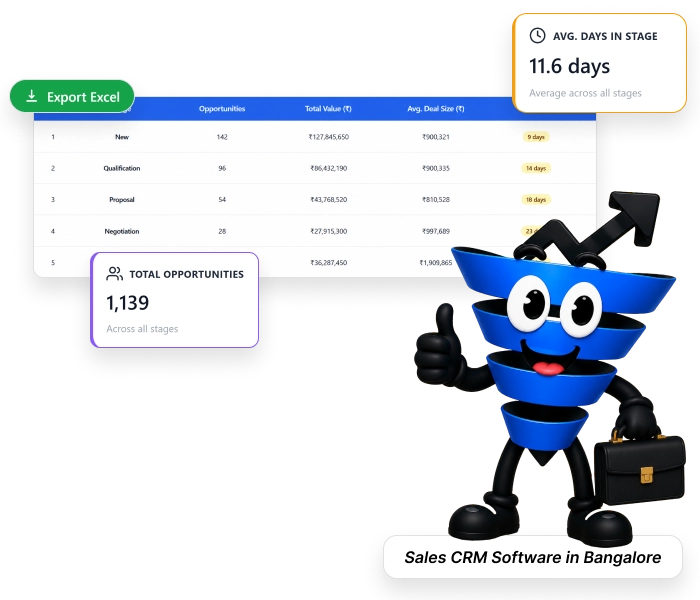
Managing Fast Moving Sales Opportunities Across Bangalore
Bangalore's technology and B2B ecosystem brings together SaaS companies, IT service providers, startups, engineering firms, manufacturers, and professional businesses. Sales teams across these sectors often manage website enquiries, demo requests, proposals, corporate requirements, and customer conversations simultaneously.
For Bangalore businesses operating in IT, SaaS, startups, B2B services, engineering, and other technology led sectors, these challenges make coordinated sales management increasingly important. OCRM connects leads, customer information, opportunities, proposals, activities, and follow-ups within one structured Sales CRM.
See how OCRM helps →Turn Digital Enquiries into Structured Sales Opportunities
Bring Digital Enquiries into the Sales Process
Capture SaaS demo requests, software enquiries, B2B consultation requests, and other business enquiries within a structured sales process. This gives sales teams a clearer view of incoming opportunities and helps them begin working on the right customer requirements.
Qualify the Business Requirement
Understand what each prospect is looking for by maintaining relevant customer and enquiry information. Whether it is an IT service requirement, engineering enquiry, manufacturing RFQ or corporate service request, sales representatives can use the available information to determine the appropriate next step.
Match Opportunities with Sales Ownership
Assign enquiries to the appropriate sales representative so each opportunity has clear ownership. This helps Bangalore sales teams coordinate responsibilities when leads move from initial enquiry into active sales discussions.
Keep Customer Discussions Connected
Maintain relevant calls, meetings, tasks, and follow-up activities alongside the customer and opportunity record. This gives sales representatives the context they need when continuing conversations with prospects and business stakeholders.
Progress Proposals and Commercial Conversations
IT projects, SaaS solutions, engineering requirements, and professional services may involve proposals, revisions, pricing discussions, and approvals. OCRM helps teams keep these sales activities connected to the opportunity while the customer evaluates the proposal.
Convert Opportunities into Customer Accounts
When an opportunity moves towards a successful decision, the customer information and sales history remain connected. This gives teams a stronger foundation for managing the account and identifying future requirements, repeat business or additional opportunities.
Every feature your team needs. Nothing they don't.
Built across 15+ powerful modules — each one solving a real daily challenge for Indian sales teams, managers, and business owners.
Lead Management Software
Capture, Track, and Convert Leads Faster
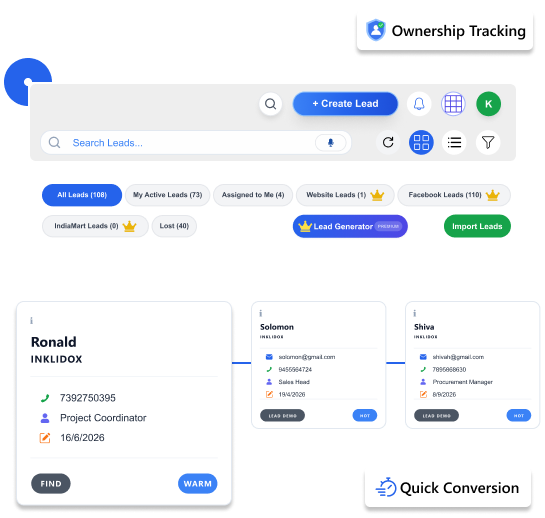
Every lead — from your website, IndiaMART, WhatsApp, or a business card scan — lands in one place. Your team gets alerted, assigned, and moving within minutes of a new enquiry.
- Capture leads from multiple sources — website forms, IndiaMART, social media, WhatsApp
- Scan visiting cards to add leads instantly on the go
- Assign leads to specific sales reps with ownership tracking
- Track lead status — Hot, Warm, Cold, Won, Lost — at every stage
- Convert qualified leads into customers with one click
- Full lifecycle visibility — from first enquiry to deal closure
Multi-source capture
Leads from WhatsApp, website, IndiaMART flow into one dashboard automatically
Card scan to lead
Point your phone camera at a business card — lead is created in seconds
Real-time status
Color-coded lead potential: Hot, Warm, Cold, Ultra Cold, Won — always visible
One-click conversion
Turn a won lead into a full customer record without re-entering any data
Faster lead response time · Improved conversion rates · Full sales visibility
Customer Management Software
Manage Customer Relationships from First Contact to Repeat Business
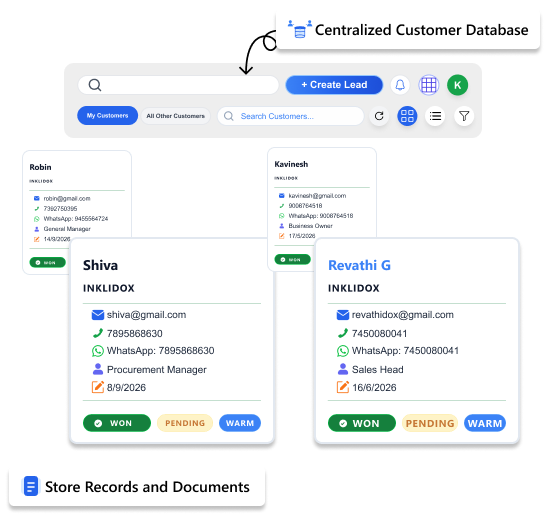
Keep every customer interaction, document, quotation, payment, and communication history in one place. OCRM helps businesses build stronger customer relationships while giving teams complete visibility into every account.
- Maintain a centralized customer database
- View complete customer interaction history
- Track quotations, payments, and support tickets
- Store customer documents and communication records
- Segment customers for targeted follow-ups
- Access customer information instantly across teams
360° Customer View
See every call, meeting, quotation, payment, and support ticket from a single customer profile.
Customer Timeline
Track every interaction from the first enquiry to ongoing support.
Shared Visibility
Sales, support, and management teams access the same customer information.
Relationship Tracking
Never lose important customer details, commitments, or follow-up history.
Better customer relationships · Improved retention · Complete customer visibility
Sales Pipeline Management Software
Track Every Opportunity and Close More Deals
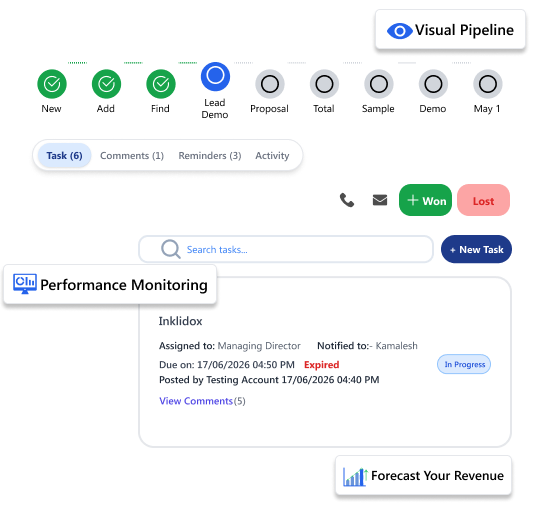
See your entire sales operation on one screen. Know which deals are moving, which are stuck, and where your revenue is coming from — without asking your team for updates.
- Visual pipeline — see every deal and its current stage at a glance
- Stage-wise deal progression — move deals through custom stages that match your actual sales process
- Opportunity management — track deal value, probability, and expected close date
- Revenue forecasting — know next month's likely revenue today
- Sales performance monitoring — track rep-wise targets and conversion rates
Pipeline dashboard
See total leads (275+), active vs lost, and lead potential distribution — all live
Revenue forecast
Total revenue tracked: ₹148Cr+ across all orgs on the platform
Stage-wise tracking
Custom stages match your actual sales cycle — not a generic template from a US market
Win/loss tracking
110 won leads out of 275 — know your exact conversion rate at any time
Better forecast accuracy · Increased visibility · Enhanced sales productivity
Task & Activity Management Software
Never Miss a Follow-Up or Sales Activity
No lead ever goes cold because someone forgot to follow up. OCRM creates tasks, sends reminders, and logs every call and meeting — so your team is always one step ahead.
- Create and assign tasks to any team member against any lead or customer
- Automated follow-up reminders — the system nudges your team before a lead goes cold
- Complete activity tracking — calls made, emails sent, meetings held, all logged
- Meeting scheduling — book and track client meetings from inside the CRM
- Call and email logging — a full record of how every deal was nurtured
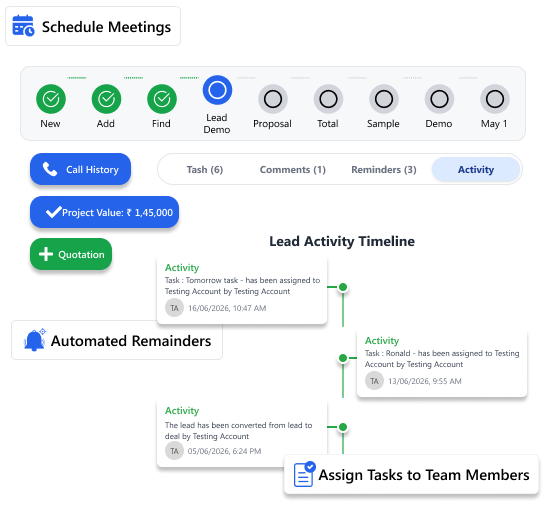
Task assignment
Manager assigns follow-up to rep with a due date — rep gets notified instantly
Smart reminders
Automatic alerts for overdue follow-ups so no hot lead ever goes cold
Activity log
Every call, email, and visit auto-logged so the whole team knows what happened
Meeting scheduling
Schedule client meetings inside the CRM with calendar sync — no separate tool needed
Better team accountability · No missed follow-ups · Increased operational efficiency
Quotation & Proposal Management Software
Create, Send, and Track Sales Quotations
Stop creating quotations in Word and sending them over WhatsApp. Build, send, and track professional quotations right inside OCRM — and know exactly when a client opens it.
- Create branded, professional quotations in minutes — not hours
- Manage proposals and pricing with version control — no confusion about which quote is final
- Track quotation status — Draft, Sent, Viewed, Approved, Rejected
- Approval workflows — get internal sign-off before a quote goes to the client
- Linked to Razorpay — client can pay directly from the quotation
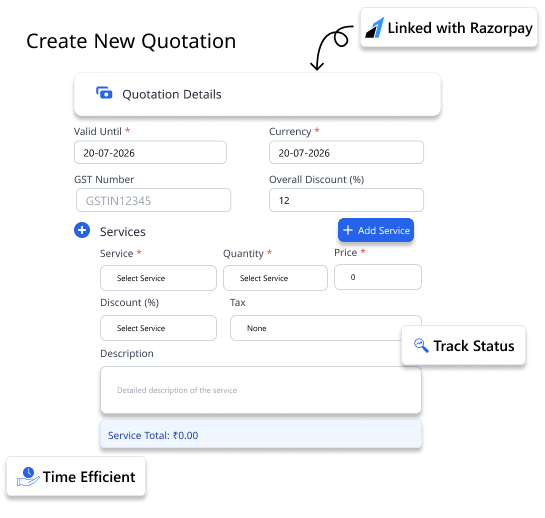
Professional templates
Ready-made templates with your logo, GST number, and payment terms pre-filled
Status tracking
Know when the client opened your quote — and follow up at exactly the right moment
Approval flow
Route quotes through manager approval before they reach the client
Razorpay linked
Client clicks "Pay Now" on the quotation and pays via UPI, card, or net banking
Faster quotation turnaround · Fewer errors · Better client experience
Call Tracking Software
Track Customer Calls and Sales Conversations
Track every customer conversation and maintain a complete communication history. OCRM records call activities, helping sales and support teams stay informed and accountable.
- Log incoming and outgoing customer calls
- Maintain complete communication history
- Track call outcomes and follow-up actions
- Monitor sales and support team activities
- Improve customer engagement with accurate interaction records
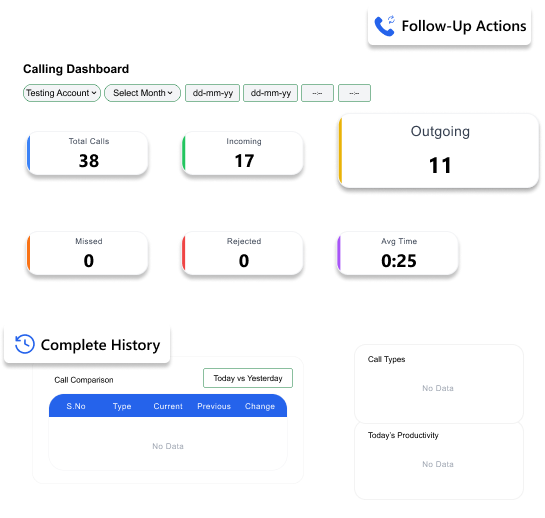
Call history
View all customer calls from a single customer profile
Follow-up tracking
Create tasks directly from call discussions
Team visibility
Managers can monitor communication activities across teams
Customer context
Know previous conversations before making the next call
Better communication tracking · Improved customer service · Complete interaction visibility
Customer Support Ticket Management Software
Manage Customer Queries and Support Requests
When something goes wrong for a customer, OCRM makes sure it gets fixed fast. Tickets are raised, assigned, escalated, and resolved — all tracked in one place.
- Ticket creation and tracking — every customer complaint gets a unique ticket ID
- Issue escalation workflows — unresolved tickets automatically escalate to the right person
- Customer service monitoring — see average resolution time and open ticket count at a glance
- Resolution tracking — close the loop and confirm customer satisfaction before marking resolved
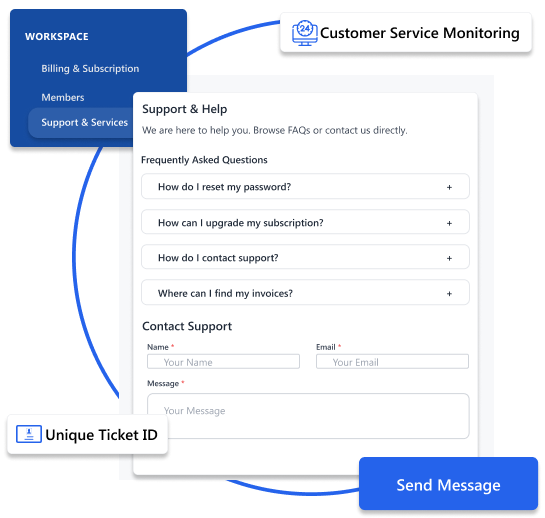
Ticket system
Raise, assign, and track every support request with a status — Open, In Progress, Resolved
Auto-escalation
Tickets unresolved beyond SLA automatically escalate to senior staff — no manual chasing
Resolution tracking
Full trail from ticket raised to issue closed — useful for accountability and audits
Support dashboard
See open tickets, average response time, and agent performance — all in one view
Faster resolution · Higher customer satisfaction · Better service accountability
Sales Reports & Analytics Software
Monitor Performance with Real-Time Sales Reports
Stop building reports in Excel every week. OCRM gives you live dashboards, team performance reports, and revenue analytics — so every Monday meeting has real numbers, not guesses.
- Lead performance reports — conversion rates, source-wise leads, stage-wise drop-offs
- Sales reports — rep-wise targets, won/lost ratio, monthly and quarterly trends
- Revenue analytics — total revenue, pipeline value, won revenue — all in INR
- Team performance dashboards — who's closing, who needs coaching
- Custom business reports — build reports specific to your industry and sales model
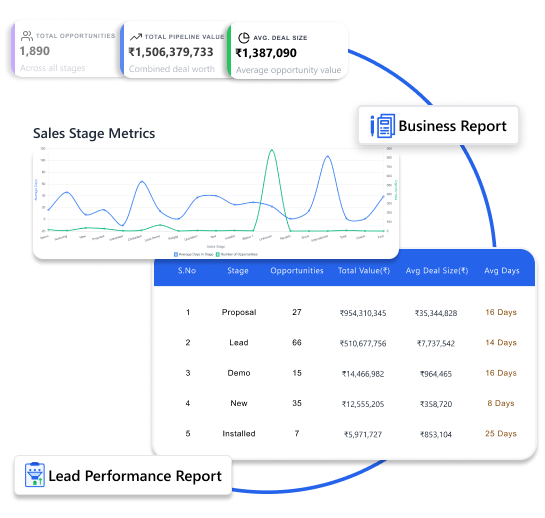
Lead potential chart
See your leads split by Hot, Warm, Cold, Won visually — like the donut chart on the dashboard
Sales pipeline stages
Pipeline stage bar chart shows exactly which stage has the most opportunities — and the most drop-off
Real-time data
Every number on your dashboard is live — not a report generated last Tuesday
Custom reports
Build reports your way — filter by team, region, product, or time period
Data-driven decisions · Full business visibility · Better performance tracking
Document Management Software
Store and Access Business Documents in One Place
Keep every customer-related document organised, secure, and accessible from a single place. OCRM helps your team manage contracts, quotations, purchase orders, agreements, and other important files without relying on email threads or scattered folders.
- Upload and manage contracts, quotations, invoices, and customer documents
- Store purchase orders, agreements, KYC documents, and attachments against the right customer
- Control access with role-based permissions
- Maintain a centralized repository for business records
- Integrate with Google Drive and cloud storage platforms
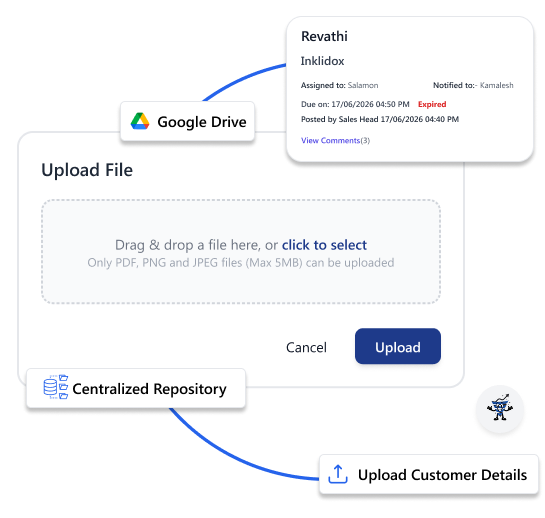
Customer Document Hub
Open a customer profile and instantly access all related contracts, quotations, invoices, and agreements.
Quick Search
Find any document in seconds without digging through emails or folders.
Secure Access
Sensitive files are visible only to authorized users.
Cloud Integration
Sync documents with Google Drive for easy access and backup.
Less paperwork · Faster retrieval · Better document control
User & Role Management Software
Control Access and Secure Business Data
Control exactly who sees what. Give your sales team access to leads. Give your accounts team access to invoices. Keep sensitive business data visible only to those who need it.
- Role-based access control — define exactly what each role can view, edit, or delete
- Department-wise permissions — Sales, Support, Management each see what's relevant to them
- User activity tracking — full audit trail of who did what and when
- Secure authentication — only authorised users get in
- Manage 51+ users across the org with individual login credentials
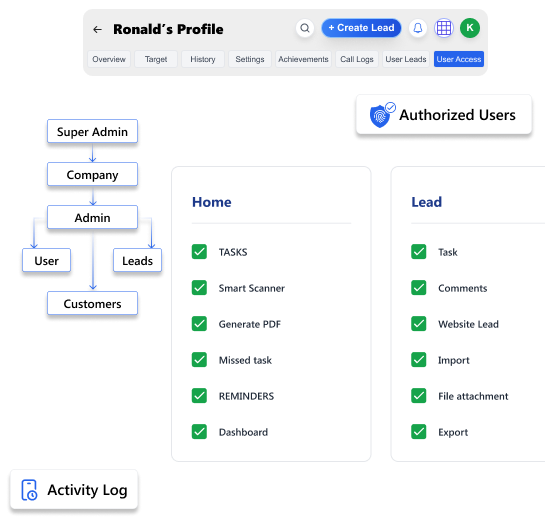
Role control
Admin, Manager, Sales Rep, Support Agent — each role sees only what they need
Activity audit trail
Full log of logins, edits, and deletions — useful for accountability and compliance
51+ users supported
Scale your team without worrying about access conflicts or data leaks
Secure platform
Your customer data is protected with secure login and controlled access at every level
Improved security · Controlled data access · Better compliance
Mobile CRM App for Field Sales Teams
Manage Leads and Customers from Anywhere
Your sales team is always in the field. OCRM's Android app means they can update lead status, log a call, check the pipeline, and create a task from any phone — even on the road.
- Full Android app — everything the desktop can do, on your phone
- Access all customer information while on the move — at client sites, trade shows, anywhere
- Real-time updates — changes sync instantly across the whole team
- Scan business cards to create leads on-site without typing anything
- Mobile-first UI — designed for Indian field sales teams, not office desktops
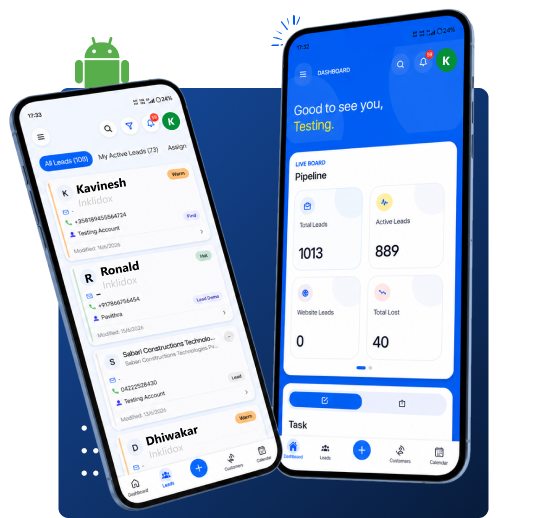
On-site lead update
Rep visits a client, updates lead status to "Hot" from their phone before leaving the parking lot
Card scan on the go
Scan a business card at an exhibition — lead is in the CRM before the next stall
Real-time sync
Manager sees field rep's update instantly — no end-of-day reports needed
Customer info access
Pull up full customer history before walking into a meeting — no laptop needed
Increased mobility · Faster response · Improved field sales efficiency
Media Library for Sales & Marketing Teams
Manage Brochures, Catalogs, Images, and Videos
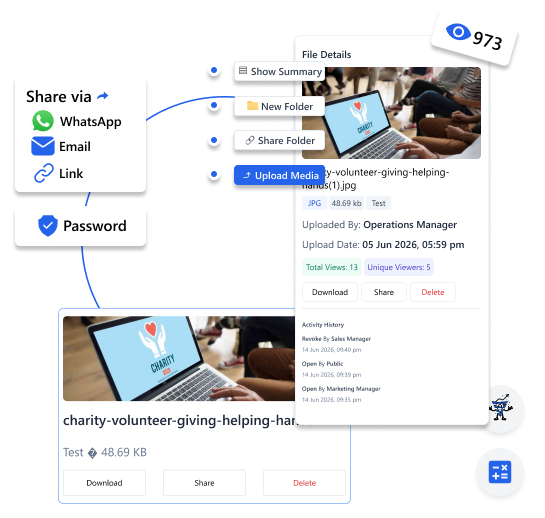
Give your team instant access to the latest brochures, catalogs, product images, videos, presentations, and price lists. OCRM's Media Library keeps all marketing assets organised and ready to share.
- Store brochures, catalogs, product images, videos, presentations, and price lists
- Access sales and marketing materials from one location
- Share resources instantly with prospects and customers
- Ensure teams always use the latest approved materials
- Organize assets by category, product, or department
Centralized Asset Library
Upload once and make files available across the organization.
Instant Sharing
Send brochures, catalogs, product videos, and presentations directly to prospects.
Version Control
Ensure every team member uses the latest approved marketing materials.
Fast Access
Find files quickly without searching across multiple folders and chat groups.
Better asset management · Faster sharing · Improved sales productivity
Keeping Bangalore Sales Opportunities on Track as Teams Expand
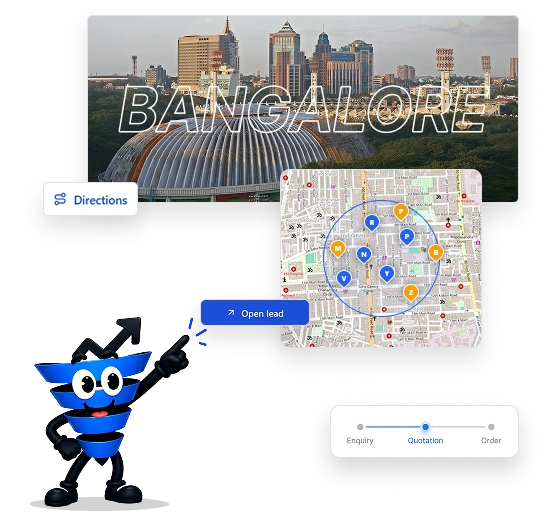
Bangalore's fast-moving technology and B2B market brings together IT services, SaaS companies, startups, professional services, engineering businesses, and enterprise organizations. Sales teams often manage website enquiries, software requirements, demos, consultations, proposals, and stakeholder conversations within the same opportunity. As these activities increase, maintaining consistent customer context across the sales team can become challenging.
OCRM gives Bangalore sales teams a connected environment for organizing leads, customer information, opportunities, proposals, quotations, and sales activities. Representatives can maintain relevant sales information throughout customer interactions, while managers can gain a clearer view of opportunity movement, pending actions, and overall pipeline progress.
Connect OCRM with 50+ Business Applications
WhatsApp for follow-ups. Razorpay for payments. IndiaMART for leads. GST validation baked in. OCRM speaks the language of Indian business — unlike any global CRM can.
 WhatsApp
  IndiaMART
  Razorpay
  GST Validation
 ERPNext
 Tally
Tally Xero
Xero Stripe
 PayPal
 Gmail
Gmail Outlook
 Google Calendar
 Google Drive
 Dropbox
 Zendesk
 HubSpot Marketing
 LinkedIn
 Meta Ads
 Website Forms
Keep Sales Leadership Informed Without Slowing the Sales Team
A growing sales operation needs visibility at the management level without adding unnecessary administrative work for sales representatives. OCRM connects sales activities, customer information, opportunities, quotations, and follow-ups so managers can monitor progress while teams stay focused on moving deals forward.
| For Business Owners & Sales Managers | For Sales Teams |
|---|---|
| Get complete visibility into your sales pipeline | Access leads and customer information from anywhere |
| Monitor team performance with real-time dashboards | Receive assigned leads instantly |
| Track pending quotations and follow-ups | Schedule calls, meetings, and follow-ups with reminders |
| Identify high-value sales opportunities | Update lead status after every customer interaction |
| Make informed decisions with sales reports | Create and share quotations quickly |
| Manage multiple sales representatives from one platform | Track every opportunity from enquiry to deal closure |
| Improve forecasting and sales planning | Reduce manual work and spend more time selling |
Why Sales Teams Need More Than Disconnected Sales Tools
Bring Digital Leads into One Sales View
Connect website, campaign, demo, and business enquiries with customer records and opportunities, giving sales teams a clearer view of incoming prospects.
Maintain Context Across B2B Sales Cycles
Connect customer requirements, proposals, discussions, and follow-ups so teams can maintain context across longer B2B sales opportunities.
Give Sales Representatives Clear Ownership
Assign leads and opportunities to the right sales representatives, making responsibilities clearer and helping teams coordinate sales activities efficiently.
Keep Proposals Moving
Organize proposal and quotation activities with the relevant opportunity, helping sales teams identify pending actions and continue commercial discussions.
Give Managers Pipeline Visibility
Give managers centralized visibility into active opportunities, team activities, pending sales engagements, and pipeline progress for better sales planning.
Reduce Dependence on Spreadsheets and Personal Records
Move customer information, opportunities, activities, and next actions from scattered spreadsheets into one structured CRM environment for shared access.
Manage Sales Across Bangalore's Key Business Sectors
Bangalore's diverse business ecosystem creates different sales requirements across technology, startups, engineering, professional services, healthcare, and logistics. OCRM helps these businesses manage enquiries, customer requirements, opportunities, proposals, quotations, and follow-ups through structured sales processes.

IT & Software Services
Manage software enquiries, consultation requests, proposals, customer requirements, decision makers, and follow-ups across longer technology sales cycles.

SaaS & B2B Technology
Track website enquiries, demo requests, qualified opportunities, proposals, stakeholder discussions, and conversion progress through one connected sales pipeline.

Startups & SMEs
Build a structured sales process around leads, customer records, opportunities, follow-ups, and sales activities as teams move beyond founder-led selling.

Manufacturing & Engineering
Manage RFQs, technical requirements, customer accounts, quotations, sales opportunities, and next actions across industrial sales processes.

Automotive & Components
Organize vendor enquiries, component requirements, customer accounts, quotations, and sales activities across automotive sales opportunities.

Professional Services
Manage consultation enquiries, proposals, client requirements, decision makers, and customer interactions across service based sales cycles.

Healthcare & Life Sciences
Track service enquiries, corporate requirements, partnership opportunities, proposals, and customer communication through a structured sales process.

Logistics & Transportation
Manage corporate enquiries, service requirements, quotations, customer accounts, and recurring business opportunities through one centralized Sales CRM.
Sales Support Across Bangalore's Technology & Business Hubs
Bangalore Business Areas:
- Whitefield & ITPL
- Electronic City
- Koramangala
- Indiranagar
- HSR Layout
- Marathahalli
- Bellandur
- Hebbal & Yeshwanthpur
- Jayanagar
- Devanahalli
- Rajajinagar
- Malleshwaram
- Bommanahalli
- Hosur Road
Why Excel and WhatsApp Are Not Enough for Growing Sales Teams
Many growing businesses start managing sales through Excel sheets and WhatsApp messages. While these tools work initially, they create challenges when enquiries increase.
Common issues include:
- Lost customer information
- Missed follow-ups
- Duplicate data
- No sales pipeline visibility
- Difficult performance tracking
- OCRM brings all sales activities into one organized system.

Give Your Sales Process the Structure to Scale
Bangalore's technology and B2B businesses often manage sales across multiple lead sources, customer conversations, proposals, and team members. Whether your team is handling SaaS enquiries, IT proposals, engineering requirements, corporate accounts or professional service opportunities, OCRM helps bring the sales process into one connected platform.
