n8n Automation Services for Workflows, ERP & CRM
Connect your business systems and automate complete processes through custom n8n workflows. Inklidox connects CRM, AI, APIs, databases, WhatsApp, email, Google Calendar, social media, and other business applications to analyse information, determine workflow actions, generate content, request approval when required and execute approved processes.
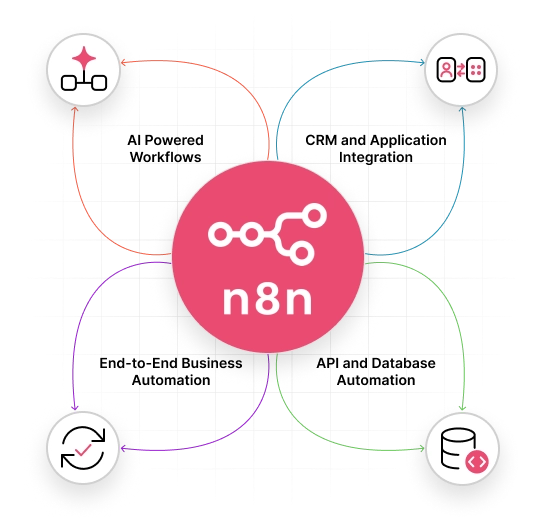
- AI Powered Workflows
- CRM and Application Integration
- API and Database Automation
- End-to-End Business Automation
What Is n8n Workflow Automation?
n8n is a workflow automation software that connects applications and services through configurable workflows. It enables businesses to transfer information, process data, apply conditions, perform tasks, and manage connected processes through a single workflow.
Businesses can connect CRM, databases, communication platforms, APIs, AI services, and internal systems to process information, trigger actions, and coordinate activities across applications.
AI Powered n8n Workflow Automation Services
Connect AI capabilities with your existing business systems to automate tasks that require data analysis, classification, extraction, and intelligent decision making. Inklidox develops n8n AI workflows that can process incoming information, apply AI models, and trigger the appropriate business action automatically.
AI-Powered Lead Follow-up
Analyze leads with AI to assess quality, intent, and requirements. n8n classifies each lead, determines the next action, generates personalized communication, updates the CRM, and alerts the salesperson.
Email Classification
Sort incoming emails by enquiry type, sales request, support issue or other defined categories. n8n can extract key details and route each message to the relevant CRM, team or workflow automatically.
n8n AI Agents
Create AI agent workflows that can use connected tools to retrieve information, evaluate defined conditions, and perform specific tasks. n8n can coordinate these actions with your existing business systems.
Customer Enquiry Processing
Turn incoming customer enquiries into structured workflow actions. n8n can identify the request type, extract key details, update the CRM, and route the enquiry to the appropriate team or communication channel.
Intelligent Data Extraction
Extract names, contact details, requirements, order information or other defined fields from emails, forms, and documents. n8n can structure the data and send it directly to your connected systems.
AI Assisted Customer Support
Classify customer messages, identify the issue, and pass relevant context into the support workflow. n8n can connect AI processing with CRM records, knowledge sources, and customer communication channels.
n8n Automation for Real Business Use Cases
Automate the repetitive steps behind sales, customer communication, data management, and everyday business operations with workflows designed around your existing systems.
CRM and AI-Powered Lead Management
Use AI to analyse leads, determine next actions, update CRM records, and trigger personalised follow-ups.
- Analyse lead quality and enquiry intent with AI
- Evaluate customer information and requirements
- Classify leads using defined business conditions
- Assign qualified leads to the appropriate salesperson
- Send personalised WhatsApp or email communication
- Create follow-up tasks based on lead conditions
- Update CRM records and trigger other workflows
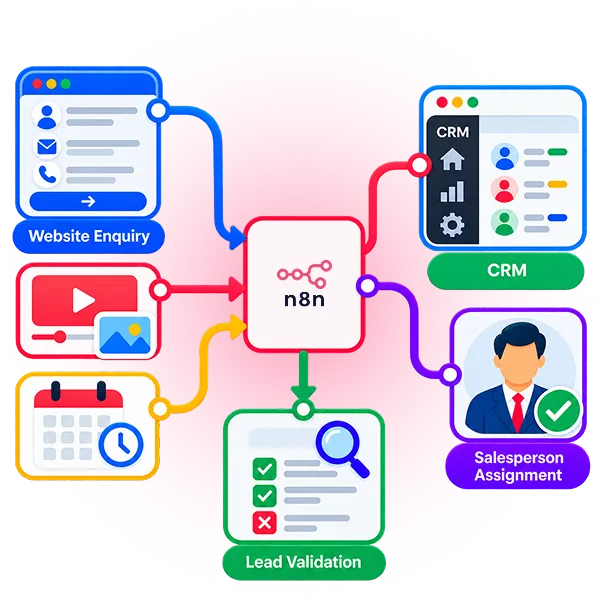
Workflow: Website Enquiry → n8n → Lead Validation → CRM → Salesperson Assignment
Sales Pipeline Automation
Keep opportunities moving by automating routine sales activities, CRM updates, follow ups, and team notifications.
- Automate lead qualification and routing
- Create opportunities from qualified leads
- Update sales stages from defined triggers
- Create follow up tasks automatically
- Trigger quotation and proposal notifications
- Alert teams when pipeline actions are required
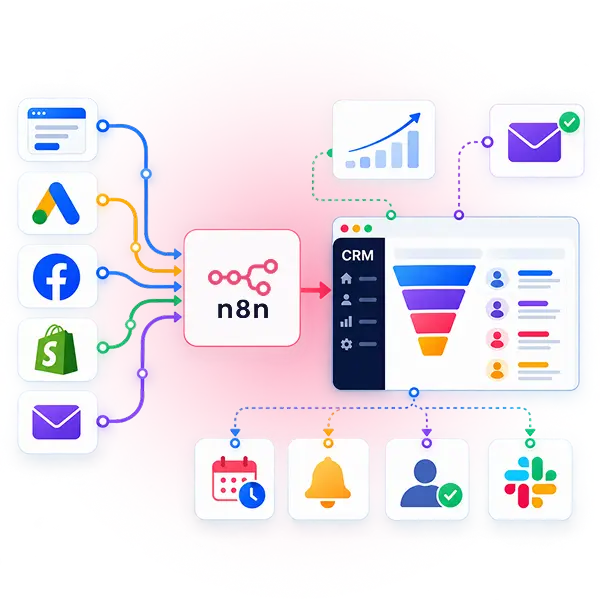
Workflow: Qualified Lead → n8n → Opportunity → Pipeline Stage → Follow Up → Sales Notification
Customer Communication
Connect customer events with communication channels to automate relevant messages, confirmations, reminders, and updates.
- Send automated WhatsApp messages after key events
- Trigger emails when customer records are updated
- Send appointment and meeting confirmations automatically
- Deliver follow up reminders based on customer activity
- Route incoming messages to the appropriate team
- Keep communication records connected to customer records
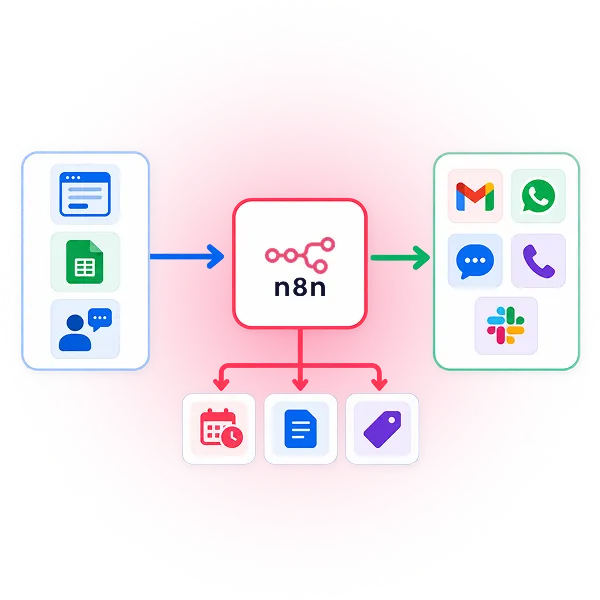
Workflow: Customer Event → n8n → Data Check → WhatsApp or Email → Customer
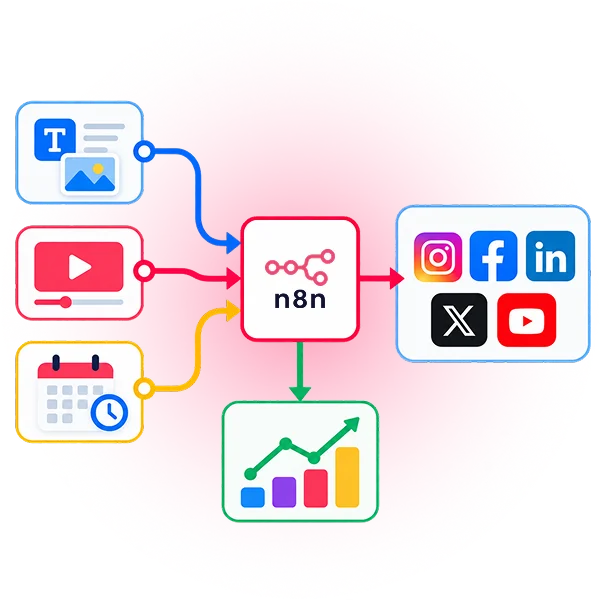
Social Media Automation
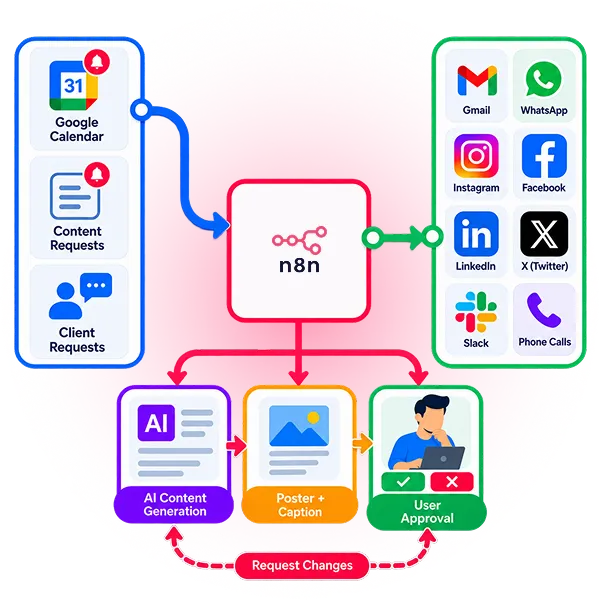
Connect calendars, AI, and social platforms to generate, approve, schedule, and publish business content.
- Trigger workflows from scheduled calendar events
- Identify upcoming business dates and special occasions
- Generate social media captions using AI
- Create poster or creative concepts with AI
- Send generated content for user approval
- Publish approved content to connected social platforms
Workflow: Google Calendar or Event → n8n → AI Content Generation → Poster + Caption → User Approval → Social Media Publishing
Approval-Based Automation
Add human approval steps to AI workflows before important content, decisions or business actions are executed.
- Add approval steps before important actions
- Send AI-generated content for review
- Continue workflows only after approval
- Maintain human control over defined business actions
- Execute approved actions automatically
Workflow: AI Output → n8n → User Approval → Approved Action → System Update
Data Synchronization
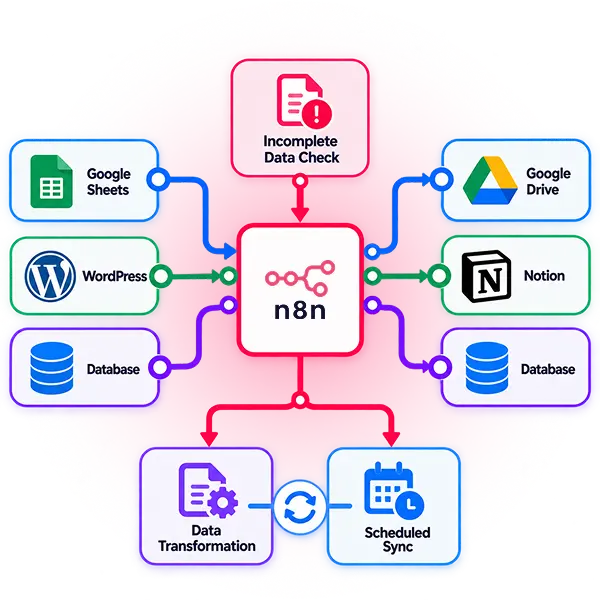
Move and update information between connected applications to reduce duplicate data entry and maintain consistent business records.
- Transfer customer records between connected systems
- Synchronize CRM data with external databases
- Update records when information changes in another system
- Transform data before sending it to another application
- Schedule recurring data synchronization workflows
- Detect and handle incomplete data before processing
Workflow: System A → n8n → Data Processing → System B → Record Update
Payment Workflows
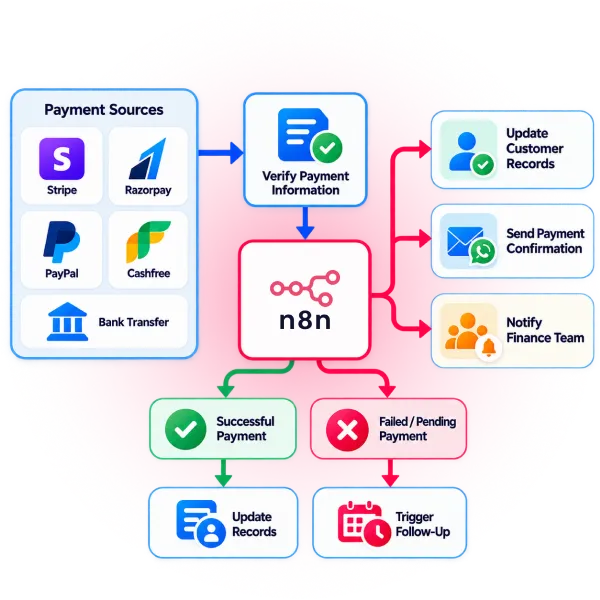
Connect payment events with business applications to automate confirmations, record updates, and notifications after transactions.
- Trigger workflows when payment status changes
- Verify payment information before updating records
- Update customer records after successful payments
- Send payment confirmations through email or WhatsApp
- Notify finance teams about completed transactions
- Trigger follow up actions for failed or pending payments
Workflow: Payment Event → n8n → Verification → CRM Update → Notification
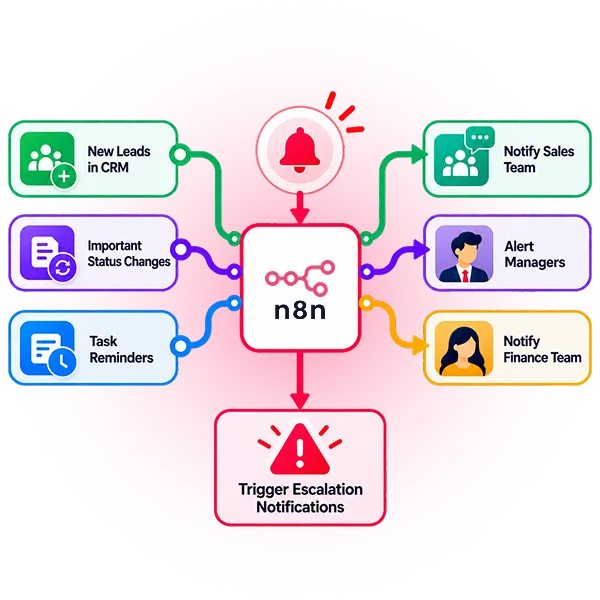
Internal Notifications
Keep teams informed about important business events by automatically sending alerts when defined conditions or actions occur.
- Notify teams when new leads enter the CRM
- Alert managers when important status changes occur
- Send task reminders to assigned team members
- Notify finance teams about payment related events
- Alert support teams about new customer requests
- Trigger escalation notifications for defined conditions
Workflow: Business Event → n8n → Condition Check → Team Notification → Action
Connect Your Business Applications with n8n Workflow

CRM Integration
Connect CRM systems with lead sources, customer platforms, and internal tools to automate record updates, lead routing, sales activities, and follow ups.

Website Integration
Connect website forms and customer actions with your CRM and internal systems to capture enquiries, process submitted data, assign leads, and trigger notifications.

WhatsApp Automation
Connect WhatsApp with CRM and business workflows to automate customer notifications, enquiry responses, reminders, confirmations, and follow up communication.

Email Integration
Automate emails triggered by business events, including lead notifications, customer updates, enquiry responses, reminders, confirmations, and internal communications.

Google Calendar Integration
Connect Google Calendar with n8n to trigger workflows based on scheduled meetings, business events, important dates, and special occasions.

API Integration
Connect applications through APIs to exchange, transform, and process business data automatically, including systems without a ready made integration.

Database Integration
Connect databases with CRM, websites, and other applications to automate record creation, updates, data transfers, synchronization, and scheduled processing.
Payment Integration
Connect payment platforms with business systems to process transaction events, update customer records, send confirmations, and notify relevant teams automatically.

Social Media Integration
Connect social media platforms with n8n to publish approved content, automate scheduled posts, and trigger publishing workflows based on business events and calendar schedules.
Application Integration
Connect business applications through n8n to exchange data, trigger actions, and coordinate connected systems as part of an end-to-end business process.
AI-Powered Integration
Connect AI with CRM and lead data to assess intent, classify leads, determine next steps, and trigger the required workflow action.

Approval-Based Workflow Automation
Add approval steps so generated content or important actions can be reviewed before n8n continues and executes the approved action.
From n8n Workflow Development to Ongoing Support

Understand
Review your existing processes, systems, repetitive tasks, and automation requirements to identify where n8n can add practical value.
Design
Map triggers, actions, conditions, data flow, and system interactions before development begins.
Integrate
Connect the required CRM, APIs, databases, websites, communication platforms, and other business applications.
Develop
Build the custom n8n workflow according to the approved process and integration requirements.

Test
Check workflow logic, data accuracy, conditions, integrations, and error scenarios before deployment.

Deploy
Move the tested workflow into the required environment and verify that automated processes operate as expected.

Monitor and Optimize
Monitor workflow execution, troubleshoot issues, update integrations, and optimize automation as business requirements and connected systems change.
Why Businesses Choose Inklidox for n8n Automation
Business Specific Workflow Design
We analyze existing processes and develop custom workflows around your business requirements, systems, triggers, and operational logic.
Reliable Integration and Testing
We connect applications through APIs, databases, and other integrations, then test data flow, conditions, and error scenarios before deployment.
Practical AI Workflow Implementation
We integrate AI into workflows where it can support defined tasks such as lead qualification, classification, data extraction, and customer enquiry processing.
Ongoing Optimization and Support
We provide workflow maintenance, troubleshooting, integration updates, and optimization to keep your automated processes aligned with changing business requirements.
Make Your Business Systems Work Together
Connect your CRM, APIs, databases, communication platforms, and other business applications through custom n8n workflows. Inklidox can help you identify automation opportunities, build the required workflows, and support them as your processes evolve.
Call us Whatsapp